People ask me how to start off in IT as a devops engineer. If you’ve asked me and been referred here – congrats. You are one of the people that made me sit down and actually write out the reasons why, rather than just mumble some half thought out response.Before we go any further though, this post is going to be pretty Amazon Web Services heavy. There are other cloud providers out there of course, but AWS to me is the one that offers the greatest breadth of services, and use for most every situation. So please don’t thjink I’ve never used Azure, or GCP – I have, but for someone starting out, AWS is the clear winner.
So you want to become a DevOps engineer? How long you think that is going to take?
Well, it’s decades. At least. Sorry to break that to you. Lets look at why that is the case though..
First, lets ask the question… what is Devops? Well I find that one of the best definitions I ever found was here.. https://aws.amazon.com/devops/what-is-devops/
DevOps is the combination of cultural philosophies, practices, and tools that increases an organization’s ability to deliver applications and services at high velocity: evolving and improving products at a faster pace than organizations using traditional software development and infrastructure management processes. This speed enables organizations to better serve their customers and compete more effectively in the market.
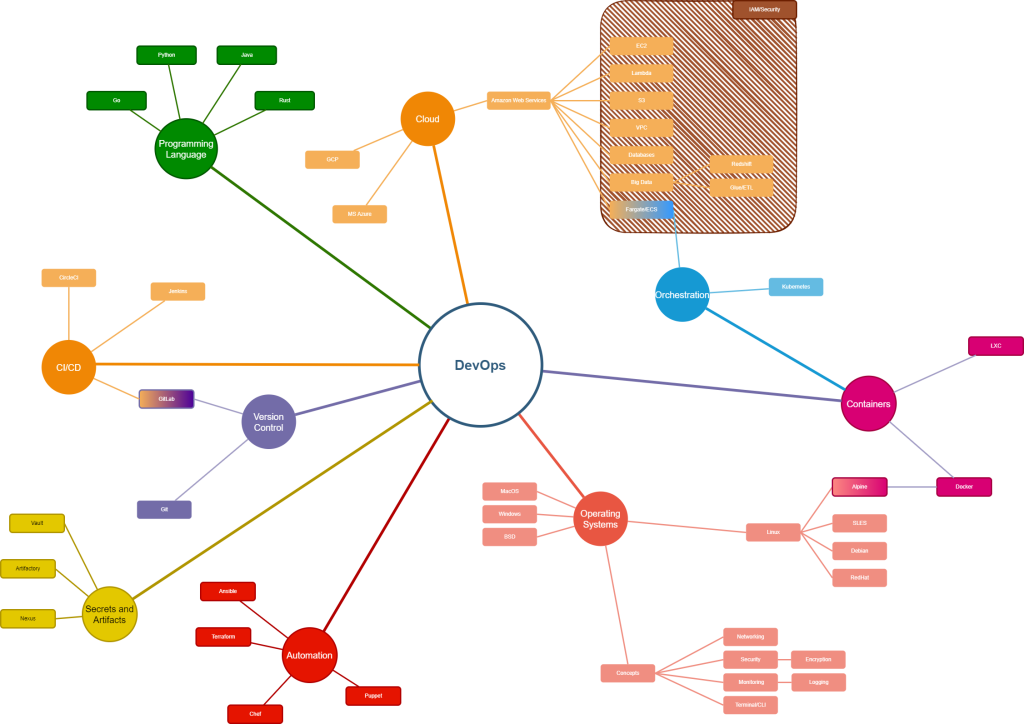
DevOps uses an amazing variety of tools and skillsets to deliver what it promises, and that takes a lot of skill and commitment. Devops engineers come from a development or a sysadmim background typically – and they are generally highly competent in those. To get there takes time, and until I started looking at the enormity of what I needed to know, I didn’t appreciate fully what was needed, and how long it would take me to learn it again from scratch – so I wrote a roadmap of what I needed – as a minimum to know.
You can see the map here, attached as the graphic. Everything on here is a needed item – you don’t have to be an expert to understand them, and to be honest no devops engineer is going to have truly deep knowledge of all of them. But you do have to have a good appreciation of them, and know what the tooling and technology does, and where to get answers when you need to go looking. As a devops engineer you are expected to know this, to be able to fix this, and generally the expectation is that you can, and will do so.
Each section has my recommendations for what you want to learn, and some useful resources for doing so.
Lets start with the first.
Coding
This is the prime requisite. If you cannot code, you cannot develop things, and that is a pretty poor situation for someone whose title starts with “dev”. You need to have a good coding base, and these days it is easy to make a recommendation. It used to be a toss up between Python and Java, but now, with the seemingly unstoppable rise of Python in big data, this is the easy option to make.
Python – 100 days of Code by Dr Angela Yu, https://www.udemy.com/course/100-days-of-code
Learn Python, learn it every day, use it every day to solve problems and develop code snippets. Once you have Python covered, it will be far easier to pick up more formal languages, like Rust and Go as well as Java.
Operating Systems
No matter what code you write and develop, at some point you are going to have to run it on an operating system somewhere… You can go serverless, and that is a possibility, but even the best serverless systems tend to have a few places where a long term task needs to run, and that implies an operating system somewhere. Most people will be best served learning Linux to start with, which then begs the question as to which distribution. I would in my experience say that about 90% of all commercial use cases run on either RedHat or Debian, with the remainder using SLES. It is probably wise to learna little more than what a standard user does about Windows and Windows server, but unless you know you are going to need it in your current or targetted employment, I wouldn’t consider it just yet.
Linux – Debian and RHEL
Also, consider that to run an OS effectivly, you should know a considerable amount about the underlying workings of it. Netowrking, security and monitoring and troubleshooting – and being familiar with these is the bare minimum that would be needed
Cloud
You don’t need to know any cloud systems at all to actually be a DevOps engineer. There isn’t actually anything that says that you have to take all of your on premise systems and put them in the cloud. It’s just that, if you start doing things the DevOps way – then the sheer utility, and conveneince, and scalability of the cloud becomes quite clear and is a natural accompaniment to it. As I have said before, AWS would be the first and best choice – it’s by far the most popular cloud, and has a huge range of services and technologies and facilities that mean you will find something useful regardless of your use case – and also will find things that you never knew even existed, and which are immediately useful.
The other useful thing about AWS is that you can get to use it, for free, for an entire year. This makes it an excellent platform for learning on, free of charge. The link for this is below. There is also excellent documentation, which although sometimes, shall we say is a little voluminous is extremely comprehensive.
Free Tier: https://aws.amazon.com/free
AWS has a number of common technologies, and the following are links to the documentation for the most commonly encountered ones. These are the core learnings that everyone using cloud will need, more or less immediately
EC2: https://docs.aws.amazon.com/ec2/?nc2=h_ql_doc_ec2
S3: https://docs.aws.amazon.com/s3/?nc2=h_ql_doc_s3
AWS CLI: https://docs.aws.amazon.com/cli/?nc2=h_ql_doc_cli
AWS IAM: https://docs.aws.amazon.com/iam/?nc2=h_ql_doc_iam
AWS RDS: https://docs.aws.amazon.com/rds/?nc2=h_ql_doc_rds
Whilst learning and getting up to speed on Python, I would also strongly suggest that you learn at the same time, AWS. They are very different things, and I always found learning a couple of thigs stops me from getting stale – if I am bogged down in learning how Python does classes, then switching to something else, like AWS stops be from losing interest.
The Cloud Practicioner course – again free – is where to start with AWS: https://aws.amazon.com/certification/certified-cloud-practitioner/
Version Control
Version control systems are something that let you organise and keep track of your code, and let you track all the changes that have been made throughout the development of the code base. Whilst you cannot often see how this is of use with just one person, and in truth it’s not that much use when starting out – consider how you track changes with dozens of people working on one codebase. When you have over a billion lines of code, as some large systems will do, with maybe a couple of thousand people working on a few hundred interlinked applications – you need to track these changes.
The answer is simple and it is called Git.
Git was written 20 years ago, and essentially, nothing else is used. It is renowned as a fearsomely unfreindly program, and thats true to an extent, but there is good documentation and there are good courses to learn as well.
Just remember, EVERYONE makes at least one massive Git howler and does something inappropriate with a rebase at some point in their career. Grasp the nettle firmly and own it – you will have to deal with this beast so there is no real option!
https://git-scm.com/book/ms/v2/Getting-Started-A-Short-History-of-Git
Git Complete by Jason Taylor: https://www.udemy.com/course/git-complete/
Once you have finished learning Git, have a look at the branching stratgies that are used by GitLab.. https://www.udemy.com/course/aws-lambda-a-practical-guide
Automation
If you have to do something twice in computing – write a script for it. Or better still, use a proper automation package.
Ansible is a configuration managment tool that lests you manage and configure all your servers from one place – be that have a dozem or upwards of (my person record) about 12,000. It solves the problem of manageing Windows systems by sort of pretending that they don’t exist, until recently that is… and even now it is still a Linux only tool really. Cosnidering that it is owned and developed by RedHat Linux that is hardly surprising though.
Paired with Ansible is Hashicorps Terraform. Terraform will build and maintain your environment in AWS for you from code, faster, quicker, and more repeatable than anything you can manage setting up by hand. This is the core of how DevOps works – an automated means of deployment and maintenance using resuable code modules that can be repurposed automatically.
Learning these is as simple as getting hands on with your free AWS account and running code – you have signed up for AWS yes…? If no – go do it now….
For Terraform – get it from the author of the language – you can find his excellent book here https://www.amazon.co.uk/Terraform-Running-Writing-Infrastructure-Code-dp-1098116747/dp/1098116747 and if you get the Kindle version there is a hefty discount
For Ansible, I have found nothing better than the published documentation – this is how it should be… https://docs.ansible.com/
Alternative packages are Chef, and Puppet, which were once suseful but have lost ground recerntly to the domination of Ansible and Terraform. Whilst I wouldnt recommend learning them in depth, unless you need to, it would be wise to at least have an understanding of them
CI/CD
This is the process of autmatically pushing the code out to the production environment. A Continously integrated system measn that when every change is checked in in Git, the code is merged into the production code base. Along the way, the Devops engineer can mandate many useful tools that run automatically and check that the code is up to quality, that it is formatted correctly, that it is properly linted, that it has no secrets plublished in the open, that it passes unit tests and function tests etc….
The tooling that does this is a CI/CD pipeline, and here there are several to choose from. The most common are perhaps Gitlab, which as you can imagine is very tightly integrated with Git, and this would be my first choice to learn. It is like so many of the tooling choices open source, and can be run at home, which is the subject of another article.
Jenkins is an older package, and one that is still common to be used. Whilst I would suggest everyone learn Gitlab, there is a lot to be said for having a good familiarity with Jenkins as well. A less common system still worth knwoing about is CircleCI.
The CI/CD pipleline can call any of a vast range of tooling and frameworks which are really too much to consider listed here, however dealing with secrets for logging into systems and also with binary objects, images, datasets etc is something that everyone will need to know. This leads into Secrets management, of which the emerging leader is Hashicorps Vault, along with Nexus and Artifactory for storing objects which cannot easily be stored in Git.
To learn GitLab, you will not find a better way that using it daily. Make it a habit to use it when you are writing code yourself, and also look here for an excellent course. https://www.udemy.com/course/gitlab-ci-pipelines-ci-cd-and-devops-for-beginners
Docker
Finally and not least is Docker and the concept of containerisaation. This allows a small fast lightweight container, which holds just enough operating system for the application that it runs to operate. Containers are a form of lightweight virtualisation, and there is no better place to learn about them from the books by Nigel Poulton. The first book runs you through everything that you will ever need to know about Docker, and the second book covers the orchestration platform Kubernetes which manages all the Docker containers that you create.
Docker: https://www.amazon.co.uk/Docker-Deep-Dive-Nigel-Poulton/dp/1916585256
Kubernetes: https://www.amazon.co.uk/Kubernetes-Book-Nigel-Poulton/dp/1916585000
In closing
Don’t be disheartened by how much there is… becoming good at anything is always a marathon not a sprint, and for something as large as DevOps, it will take a long time. But by nibbling away at it – after all even the largest meal is eaten and enjoyed one bite at a time – you will get stuck into what is one of the most fascinating pastimes and careers that I know of.